
Network Essentials11 - Get APK
You'll be able to download in few seconds.
Publisher Description
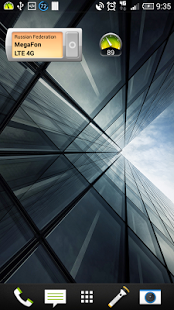
This application introduces two useful widgets: EZ Ping and Mobile Network Operator EZ Ping is useful for online internet connection speed monitoring.
Network Operator - displays current cellular network operator name and country, connection type and provides ability to quickly switch between network connection modes: GSM Only/WCDMA/Auto/LTE.
EZ Ping Widget
Tap on widget to activate continuous pinging specified URL with specified intervals. Tap again to deactivate.
The lower ping means higher the speed of the Internet connection.
You can set the limits for each color of widget - red, yellow, green.
If ping value is above 1000 ms Internet connection is pretty bad. When ping<100ms you can watch YouTube without buffering.
All settings for this widget are available in the app on “Ping prefs” tab.
Network Operator Widget
This widget is very useful while you are in roaming.
It displays current network operator name, country of the operator, connection type and button to switch between connection modes.
The widget is updated every 10 minutes. Tap on widget to update immediately.
Network Essentials (Main app)
There are 3 tabs in app.
Tab “ping prefs” is intended for adjusting ping settings:
* target URL
* amount of measurements for averaging
* Ping provider: ICMP (unavailable on some devices), HTTPSocket. HTTPConnection
* Color ranges for different ping values. There are 3 ranges - green, yellow, red. You can adjust these values manually.
* Ping interval - means time-out (is seconds) between ping attempts.
* Auto disable - means that ping process will stop automatically after specified amount of time.
* Do not ping in sleep mode - suppresses ping while device in sleep mode. It will save battery lifetime.
Tab “series prefs” is intended for adjusting series settings:
* Save measurements to series. If checked measurements will be stored in series.
* Maximum series size. When size of series exceed this value new series will be opened.
* Series prefix - prefix, that will be used as part of name of the series
* Location filter -if enabled sets minimum distance in meters between samples that will be stored in series.
* Interval filter- if enabled sets minimum interval in seconds between samples that will be stored in series.
* Interchange filter - if enabled sets every N sample will be stored in series
Tab "Series"
This tab contains stored series of samples. Samples are stored in series on tap on EzPing widget when "Save measurements to series" on tab "Series prefs" is enabled.
Tap on series to open context menu:
* Map report - Show series on map
* KML report - Show series in google earth(if exists on device)
* CSV report - opens series as CSV file (if csv-enabled application is available on device)
* Delete series - Removes selected series from database
* Delete All Series - Removes all series from database
Map view
In a map view you can switch between two modes: ping value or network generation.
Also you can share series or open it in google earth (if available on device)
About Network Essentials
The company that develops Network Essentials is Igor G Kanel. The latest version released by its developer is 11.
To install Network Essentials on your Android device, just click the green Continue To App button above to start the installation process. The app is listed on our website since 2014-06-18 and was downloaded 0 times. We have already checked if the download link is safe, however for your own protection we recommend that you scan the downloaded app with your antivirus. Your antivirus may detect the Network Essentials as malware as malware if the download link to com.kanel.ezping is broken.
How to install Network Essentials on your Android device:
- Click on the Continue To App button on our website. This will redirect you to Google Play.
- Once the Network Essentials is shown in the Google Play listing of your Android device, you can start its download and installation. Tap on the Install button located below the search bar and to the right of the app icon.
- A pop-up window with the permissions required by Network Essentials will be shown. Click on Accept to continue the process.
- Network Essentials will be downloaded onto your device, displaying a progress. Once the download completes, the installation will start and you'll get a notification after the installation is finished.
Program Details
System requirements
Download information
Pricing
Version History
version 11
posted on 2014-06-18
*Opportunity to choose ping sources (ICMP, Socket, HttpConnection). It is give -* *Opportunity to use application on devices where access to ICMP is restricted.,*Opportunity to save measurements into the series for later analysis.,*Opportunity to export saved data to KML(Google Earth is required) and CSV.,*Opportunity to share collected data with friends.,*New design of the main app
version 4
posted on 2012-12-07
Several fixes and updates
Disclaimer
External Download
We do not host Network Essentials on our servers. We did not scan it for viruses, adware, spyware or other type of malware. This app is hosted by Galad and passed their terms and conditions to be listed there. We recommend caution when installing it.
The APK Download link for Network Essentials is provided to you by apps112.com without any warranties, representations or guarantees of any kind, so access it at your own risk.
If you have questions regarding this particular app contact the publisher directly. For questions about the functionalities of apps112.com contact us.
